GOCC- Get Even with Diabetes Run 2026 r.

Activate the B4SPORT App

Register your activity during the 34rd Finale of The GOCC
Choose an event

Frequently asked questions:

Why is it worth activating the B4SPORT App?

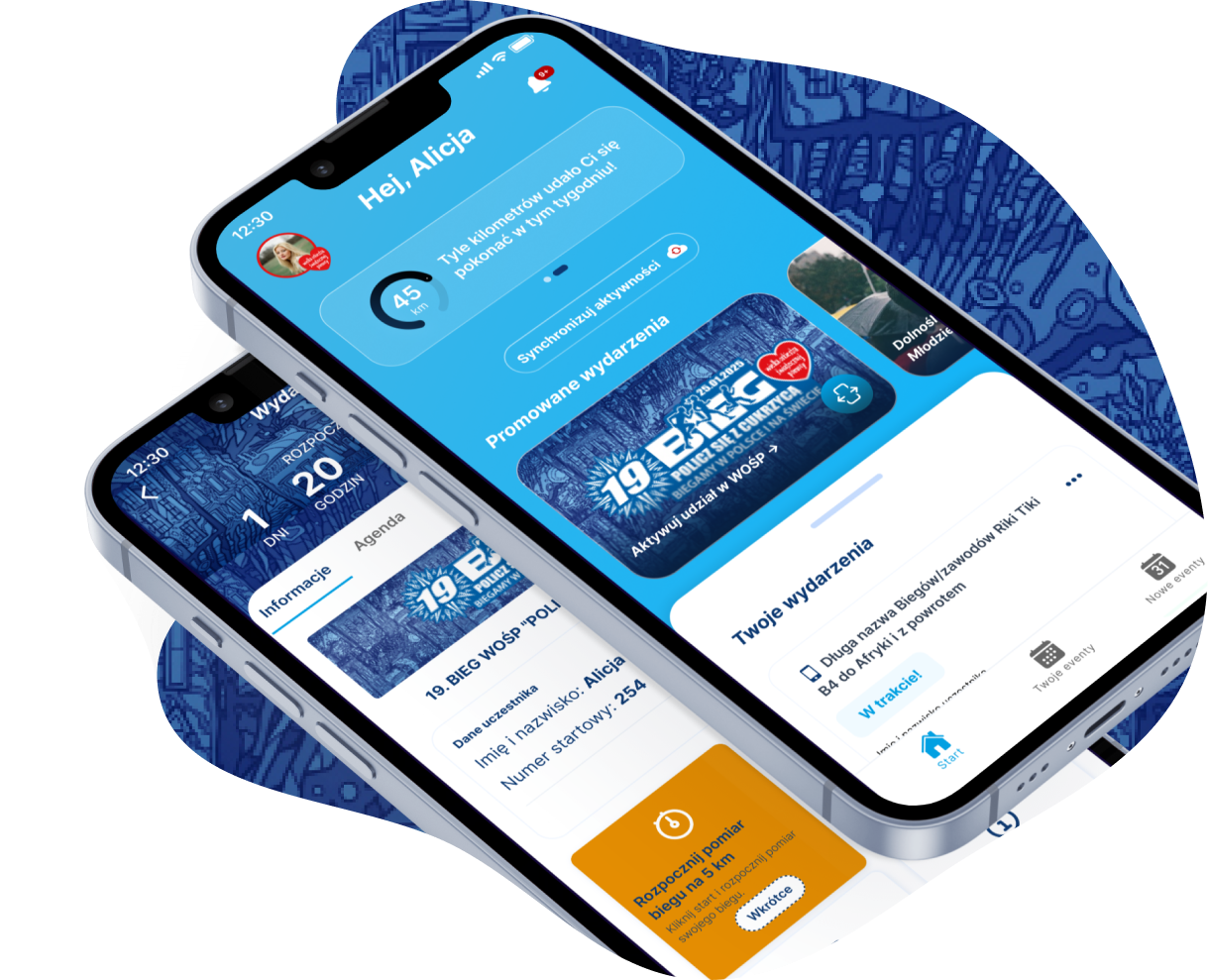
The B4SPORT App is the official mobile application chosen by the Great Orchestra of Christmas Charity (WOŚP) to support runs associated with the 34rd Finale of GOCC.

By using the app, you can:

  • Track your activity (distance and time) during GOCC events.
  • Take a selfie in GOCC themes, which you can share.
  • Receive notifications from GOCC.
  • Get an official completion certificate signed by Jurek Owsiak.
  • Add your heart to the GOCC Map and become part of the Great Orchestra of Christmas Charity community.

All this to motivate each other and show how many kind hearts are playing on the same team.

Do I have to activate the B4SPORT App?

You don’t have to, but… it’s worth it – by activating the app and registering your activity, you’re doing something truly special! It’s not just a run; it’s playing together as part of one team. Additionally, you gain access to the features the app offers.

The B4SPORT App was created with the goal of giving every athlete, and in the future, every sports event fan, their own personal sports assistant to make participation in sports events easier and more rewarding.

The release of the first version of the App (in 2025) coincided with B4SPORT’s 10th anniversary, which perfectly falls on the weekend of the 33rd Grand Finale of WOŚP (Great Orchestra of Christmas Charity). Therefore, we decided that the first version of the App would be specially adapted for WOŚP, completely free of charge. In this way, we want to support the Orchestra and all active fundraisers in achieving the charitable goal of the collection. Now, we continue the tradition we started and support WOŚP at the 20th „Get Even with Diabetes” Run.

B4SPORT is the only app chosen by GOCC to manage participation in the „Get Even with Diabetes” run and other sports events as part of the 34rd GOCC Finale. By supporting GOCC, you get free access to the B4SPORT App.

What does registering your activity during the run give you?

Registering your activity in the app is a way to show that every step you take matters – for you, for other participants, and most importantly, for the cause we are all supporting together.

By registering your activity, you will keep track of the distance you’ve covered, see your final result in the app, and receive a certificate of race completion.

Your participation will also „light up” another heart on the GOCC support map -> LINK

Which event should I choose?
  1. If you are running on January 25th in Warsaw and received a race number with a QR code on the back – choose the Warsaw GOCC Run „Get Event with Diabetes”. START NUMBERS from 1 to 8,000.
  2. If you are participating in the Virtual WOŚP Run and received a race number with a QR code on the back or received the QR code by email – choose the Virtual GOCC Run „Get Event with Diabetes”. START NUMBERS from 10,001 to 15,000.
  3. If you are taking part in one of the local partner events organized by GOCC Branches and the Organizer provided you with a QR code that brought you here – choose Sports Events of the 34rd WOŚP Finale. START NUMBERS from 8,001 to 10,000.
Is the B4SPORT App free?

The B4SPORT App is available for free to all participants of sports events as part of the 34rd Finale of the GOCC.

As part of celebrating the 10th anniversary of KAELMO’s operations under the B4SPORT brand, we decided to accelerate the release of the B4SPORT App, tailored it to the needs of GOCC, and are providing full support during the 34rd GOCC Finale, completely free of charge.

This is our contribution to those in need, supported by GOCC.

How does the classification work?

According to the regulations, there is no official ranking of participants for the Warsaw Run and the Virtual Run.

Each local sports event partnered with the GOCC has its own regulations, and the official ranking rules (if applicable) should be checked on the organizer’s website for each local event.

However, to enhance the attractiveness of participation, we have introduced an unofficial ranking for participants of each run, which will be available on the website: wyniki.b4sport.pl

The following activities are included in the ranking:

  1. Warsaw Run – ranking by distance, with a minimum cumulative distance of 5 km required
  2. Virtual Run – ranking by time over a 5 km distance
  3. Sports Events – ranking by distance, with a minimum cumulative distance of 1 km required
Where can I get the QR code if I am participating in the Sports Events of the 34rd WOŚP Finale?

Participants will receive the QR code from the organizer of the Sports Events. If the organizer does not have QR codes, they should contact the Main GOCC Headquarters.

What if I don't have an account on B4SPORTONLINE.PL?

No problem. In the B4SPORT App, you can create a new account.

To do this, select „Sign Up” on the login screen.

What if I don't remember the password to my B4SPORTONLINE.PL account?

In the B4SPORT App, you can use the password reminder feature.

To do this, click the „here” link next to „Forgot your password?” on the login page.

I can't add an activity in the app.

If you have an issue with the app, you can submit a support request. You will soon receive assistance from our Support team.

It is also possible to record your run using a watch connected to the Strava app. In the next FAQ, you will find information on how to connect the B4SPORT app with Strava.

If, however, despite our assistance, you are still unable to register your activity, you can add it manually by uploading a screenshot and clicking 'Add activity manually’ in the main event view

We will do our best to manually add your result, depending on our available time.

I’m having trouble activating the app / registering a new account / using the app.

If, after reviewing the instructions and FAQ below, you still encounter issues with the app, you can submit a support request. You will soon receive assistance from our Support team.

Can I register my run using a watch instead of the B4SPORT app?

Yes, while we recommend using the B4SPORT app to register your run, you can choose to use a watch connected to the Strava app.

Here’s how:

  1. You need a Strava account and a watch connected to it (a free Strava account is sufficient).
  2. Link the B4SPORT app to your Strava account: You can do this in your profile within the B4SPORT app.
  3. To access your profile in the B4SPORT app, you need to click on your avatar on the main page of the app.
  4. After recording your run with your watch and syncing it to the Strava app, follow these steps in the B4SPORT app:
      • Go to the GOCC run page.
      • Click the “Sync Activities” button.
      • If the app is correctly linked to your Strava account, you will see your recent activities from Strava.
      • Select the activity you want to add to the GOCC run.
      • Confirm by clicking the “Sync Activities” button again.

      Activate the B4SPORT App

      Take part in the Virtual GOCC Run „Get Even with Diabetes”

      1. Download the B4SPORT App from the App Store or Google Play.
      IMPORTANT! Make sure you have the latest version of the B4SPORT App from your phone’s App

      You can download it earlier and test some steps.

      We will also send a reminder via email and PUSH notifications, so your consent for communication is important.

      2. Log in using your B4SPORTONLINE.PL account or register in the app.
      • If you have an account on B4SPORTONLINE.PL, log in to the app using your credentials.
      • If you don’t have an account – create one by clicking the „Register” button and providing an email address you have access to, then set your password twice and enter your first and last name.
      • After accepting the terms and privacy policy -> your account will be READY.
      • If you’re using the app for the first time, remember to consent to PUSH notifications – this way, you will stay updated with information from the organizers.


      3. Activate your participation using the QR code from your race number or email.
      • After logging into the app, click the ’Support with us’ tile with the ’GOCC: Get Even with Diabetes’ logo in the ’Act and Discover’ section.”
      • Accept the terms and conditions.
      • Scan the QR code from your race number or email via the B4SPORT App (this is the same QR code that led you to this instruction).
      • In the email, there will be a QR code along with an alternative link, which: you can copy the link with the code to the application.
      • All set! Once activated, you will see the ’Get Even with Diabetes’ event in the ’Your events’ section. If you see a different event first, swipe left to view the next events. You will also receive a confirmation email for activating the app.
      • If it’s your first time in the app, you will need to grant permission for Camera and Location access several times along the way -> agree to these permissions if you want to fully enjoy the app.

      4. Register your activity between January 19 and January 25 using the START button.

      You can register your run for the virtual GOCC run once or in multiple sessions between January 19 and January 25, 2025.

      The minimum distance to run is 5 km, but you can split it into shorter segments that total 5 km or more.

      • In the app, go to ’Your events’, select the GOCC event, tap ’More’, and look for the tile with the ’START’ button. Tapping ’START’ followed by ’Start’ will start the countdown and track your activity.
      • After finishing the run, you must swipe the pause button twice and stop the measurement of your run.
      • It’s important to remember that if you don’t complete 5 km, you will be asked if you’re sure you want to finish the run.
      • Keep in mind that you can complete the run in multiple sessions, meaning you can stop the measurement and then start it again. The distance and time will be added up with your previous activities.

      5. Take a selfie and share the moment with your friends.
      • You will find the „TAKE PHOTO” button by selecting the „Get Even with Diabetes” run.
      • The button is located right next to the „START” button.
      • After taking the photo, make sure to share it with your friends.

      6. Check your result

      After each successfully registered running activity in the app, your run will be included in the unofficial race ranking shortly. The distances from your activities will be added up, and the ranking will be based on the longest distance.

      The general ranking can be found at: wyniki.b4sport.pl.

      A link to your individual result can be found in the app – on the event screen under the „Your Result” button.

      7. Receive your certificate signed by Jurek Owsiak

      Everyone who completes the virtual run will receive their individual participation certificate signed by Jurek Owsiak after a few days.

      As soon as the certificates are generated, you will receive a special notification in the app.

      To stay up to date with all notifications in the app, make sure you have PUSH notifications enabled in the B4SPORT app.

      Activate the B4SPORT App

      Take part in the Warsaw GOCC Run „Get Even with Diabetes”

      1. Download the B4SPORT App from the App Store or Google Play.
      IMPORTANT! Make sure you have the latest version of the B4SPORT App from your phone’s App

      We will also send a reminder via email and PUSH notifications, so your consent for communication is important.

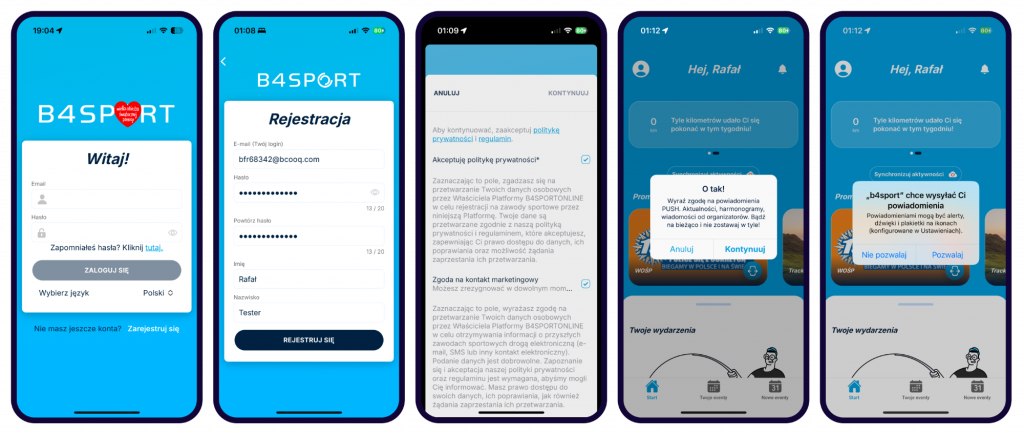
      2. Log in using your B4SPORTONLINE.PL account or register in the app.
      • If you have an account on B4SPORTONLINE.PL, log in to the app using your credentials.
      • If you don’t have an account – create one by clicking the „Register” button and providing an email address you have access to, then set your password twice and enter your first and last name.
      • After accepting the terms and privacy policy -> your account will be READY.
      • If you’re using the app for the first time, remember to consent to PUSH notifications – this way, you will stay updated with information from the organizers.
       

      3. Activate your participation using the QR code from your race number or email.
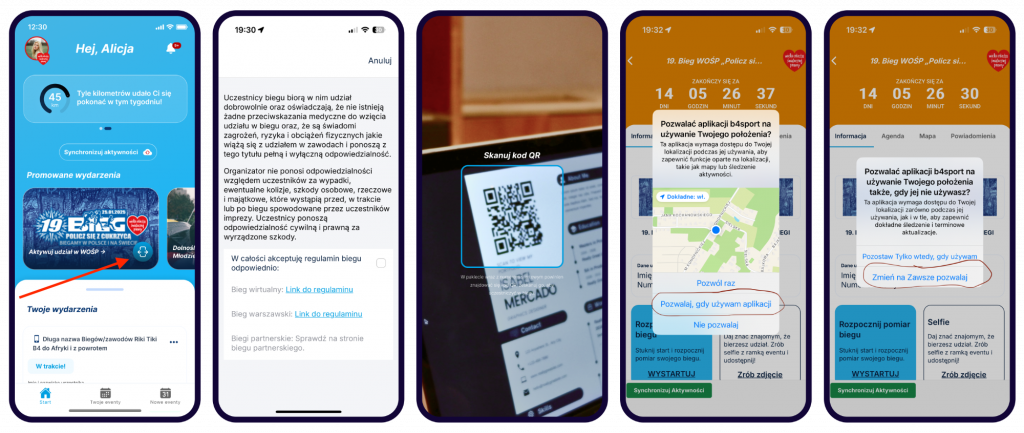
      • After logging into the app, click the ’Support with us’ tile with the ’GOCC: Get Even with Diabetes’ logo in the ’Act and Discover’ section.”
      • Accept the terms and conditions.
      • Scan the QR code from your race number or email via the B4SPORT App (this is the same QR code that led you to this instruction).
      • In the email, there will be a QR code along with an alternative link, which: you can copy the link with the code to the application.
      • Done! All set! Once activated, you will see the ’Get Even with Diabetes’ event in the ’Your events’ section. If you see a different event first, swipe left to view the next events. You will also receive a confirmation email for activating the app.
      • If it’s your first time in the app, you will need to grant permission for Camera and Location access several times along the way -> agree to these permissions if you want to fully enjoy the app.

      4. Register your activity on January 24 during the run using the START button

      Participation in the Warsaw GOCC run can only be registered during the official run, which, according to the regulations, will take place in Warsaw on January 24, 2025, at 12:00.

      The Warsaw run, following tradition, does not have an official electronic timing system, but with the use of the B4SPORT app, you can measure your run and check your result.

      • In the app, go to ’Your events’, select the GOCC event, tap ’More’, and look for the tile with the ’START’ button. Tapping ’START’ followed by ’Start’ will start the countdown and track your activity.
      • After finishing the run, you must swipe the pause button twice and stop the measurement of your run.
      • It’s important to remember that if you don’t complete 5 km, you will be asked if you’re sure you want to finish the run.
      • Remember, you can complete your run in multiple sessions, meaning you can stop the run measurement and start it again. The distance and time will be added to your previous activities, but you must register the entire distance on January 24, 2025.

      5. Take a selfie and share the moment with your friends.
      • You will find the „TAKE PHOTO” button by selecting the „Get Even with Diabetes” run.
      • The button is located right next to the „START” button.
      • After taking the photo, make sure to share it with your friends.

      6. Check your result

      After each successfully registered running activity in the app, your run will be included in the unofficial race ranking shortly. The distances from your activities will be added up, and the ranking will be based on the longest distance.

      The general ranking can be found at: wyniki.b4sport.pl.

      A link to your individual result can be found in the app – on the event screen under the „Your Result” button.

      7. Receive your certificate signed by Jurek Owsiak

      Everyone who completes the virtual run will receive their individual participation certificate signed by Jurek Owsiak after a few days.

      As soon as the certificates are generated, you will receive a special notification in the app.

      To stay up to date with all notifications in the app, make sure you have PUSH notifications enabled in the B4SPORT app.

      Activate the B4SPORT App

      Take a part in the Sports Events of the 34rd GOCC Finale.

      1. Download the B4SPORT App from the App Store or Google Play.

      IMPORTANT! Make sure you have the latest version of the B4SPORT App from your phone’s App.

      We will also send a reminder via email and PUSH notifications, so your consent for communication is important.

      2. Log in using your B4SPORTONLINE.PL account or register in the app.
      • If you have an account on B4SPORTONLINE.PL, log in to the app using your credentials.
      • If you don’t have an account – create one by clicking the „Register” button and providing an email address you have access to, then set your password twice and enter your first and last name.
      • After accepting the terms and privacy policy -> your account will be READY.
      • If you’re using the app for the first time, remember to consent to PUSH notifications – this way, you will stay updated with information from the organizers.


      3. Activate your participation using the QR code from your race number or email.
      • After logging into the app, click the ’Support with us’ tile with the ’GOCC: Get Even with Diabetes’ logo in the ’Act and Discover’ section.”
      • Accept the terms and conditions.
      • Scan the QR code from your race number or email via the B4SPORT App (this is the same QR code that led you to this instruction).
      • In the email, there will be a QR code along with an alternative link, which: you can copy the link with the code to the application.
      • Done! All set! Once activated, you will see the ’Get Even with Diabetes’ event in the ’Your events’ section. If you see a different event first, swipe left to view the next events. You will also receive a confirmation email for activating the app.
      • If it’s your first time in the app, you will need to grant permission for Camera and Location access several times along the way -> agree to these permissions if you want to fully enjoy the app.

      4. Register your running activity between December 15 and January 25 using the START button.
      Regardless of your physical participation in your local run organized as part of the 34rd GOCC Finale, you can register your run using the B4SPORT app and additionally celebrate your participation by being included in the local GOCC race ranking.

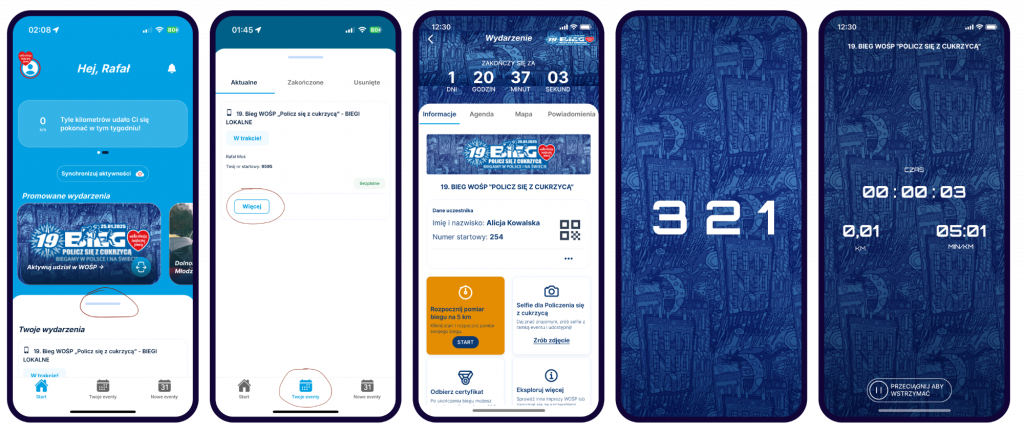
      • In the app, go to ’Your events’, select the GOCC event, tap ’More’, and look for the tile with the ’START’ button. Tapping ’START’ followed by ’Start’ will start the countdown and track your activity.
      • After finishing the run, you must swipe the pause button twice and stop the measurement of your run.
      • It’s important to remember that if you don’t complete at least 1 km, you will be asked if you’re sure you want to finish the run.
      • Keep in mind that you can complete the run in multiple sessions, meaning you can stop the measurement and then start it again. The distance and time will be added up with your previous activities.

      5. Take a selfie and share the moment with your friends.
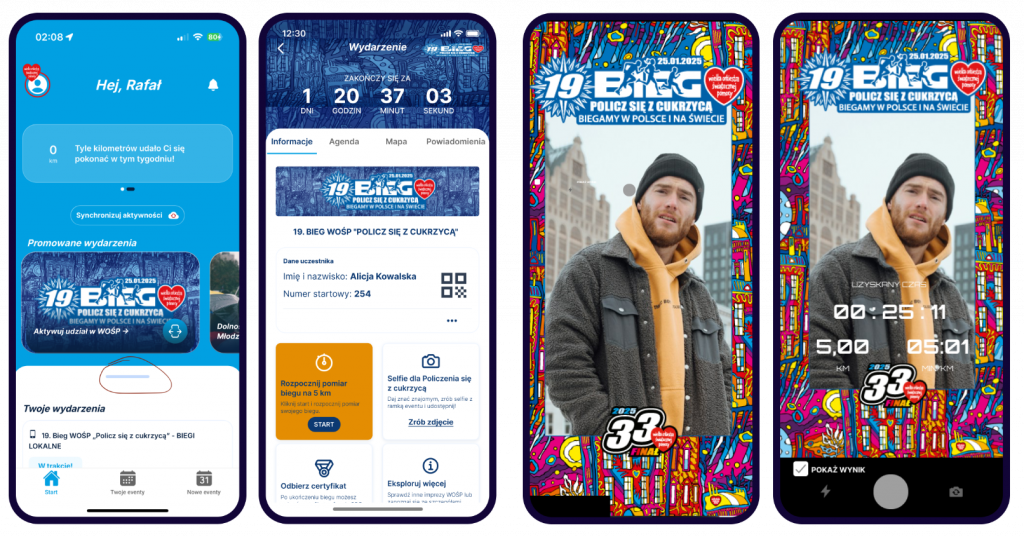
      • You will find the „TAKE PHOTO” button by selecting the „Get Even with Diabetes” run.
      • The button is located right next to the „START” button.
      • After taking the photo, make sure to share it with your friends.

      6. Check your result

      After registering each running activity in the app, your run will be included in the unofficial event ranking shortly. The ranking for local GOCC runs will be based on the longest distance.

      However, since local events are held over different distances, the minimum distance to run is 1 km.

      The general ranking can be found at: wyniki.b4sport.pl.

      A link to your individual result can be found in the app – on the event screen under the „Your Result” button.

      7. Receive your certificate signed by Jurek Owsiak

      Everyone who completes the virtual run will receive their individual participation certificate signed by Jurek Owsiak after a few days.

      As soon as the certificates are generated, you will receive a special notification in the app.

      To stay up to date with all notifications in the app, make sure you have PUSH notifications enabled in the B4SPORT app.

      policz się z cukrzycą baner biegu 2025

      Technical Support for the Application
      Create a ticket to receive assistance. This is the fastest way to get support. Please avoid duplicating tickets to prevent delays in response time.

      Alternative contact: wosp@b4sport.pl.